Candidate Pipeline
Last updated 29 days ago
Guide

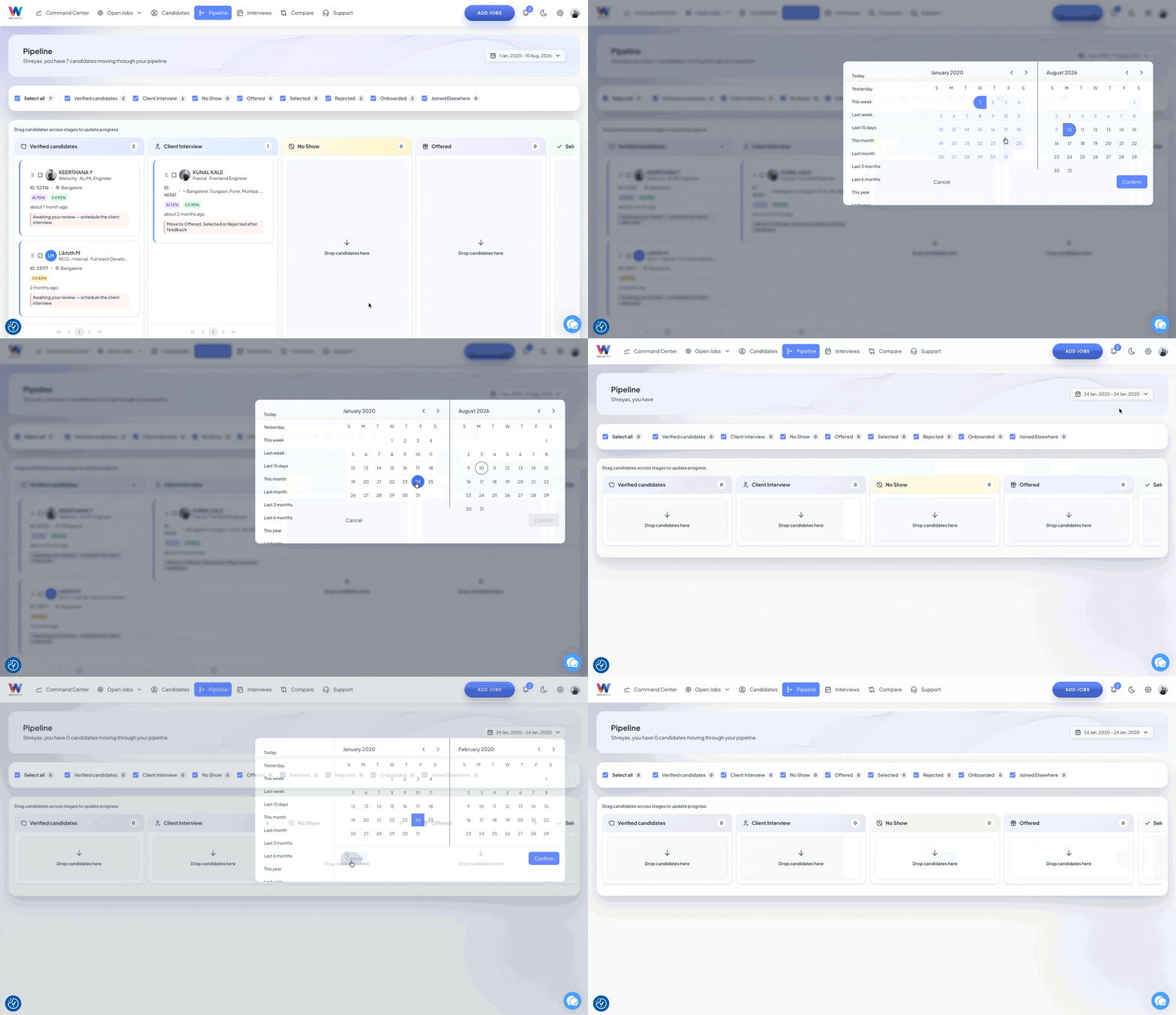
The Candidate Pipeline helps you track candidates as they move through different stages of the hiring process. You can move candidates between stages based on their current status and use the Compare option to evaluate candidates using their Octo assessment analysis.
Step 1: Understand the Pipeline Stages
The Pipeline includes the following stages:
Verified
Client Interview
No Show
Offered
Selected
Rejected
Onboarded
Joined Elsewhere
Each stage represents a different point in the candidate's hiring journey.

Step 2: Review Verified Candidates
Verified candidates are candidates who have completed their Octo interview and have been submitted by the recruiter for client review.
If the client wants to proceed with a candidate, the candidate can be moved from Verified to Client Interview.
Step 3: Move Candidates to Client Interview
Move a candidate from Verified to Client Interview when the client wants to proceed with the candidate and schedule a client interview.
Once the client interview takes place, the candidate can be moved to the appropriate next stage based on the outcome.
Step 4: Mark Candidates as No Show
If a candidate does not attend the scheduled client interview, move the candidate from Client Interview to No Show.
This helps keep track of candidates who did not attend their client interview.
Step 5: Move Successful Candidates to Offered
If the client interview goes well and the client wants to proceed with the candidate, move the candidate from Client Interview to Offered.
At this stage, the candidate can decide whether they want to accept the offer.
Step 6: Update the Candidate Based on the Offer Decision
Once a candidate reaches the Offered stage, move them to the appropriate stage based on their decision:
Selected: Move the candidate here if they accept the offer and proceed with the opportunity.
Rejected: Move the candidate here if they do not proceed with the offer.
Joined Elsewhere: Move the candidate here if they have joined another organization and are no longer available.
Step 7: Move Selected Candidates to Onboarded
Candidates who have accepted the offer can progress from Selected to Onboarded as they move through the onboarding process.
The Pipeline also shows the selected date, allowing you to identify when a candidate was selected.
Step 8: Compare Candidates
You can also compare candidates directly from the Pipeline when you need to decide which candidate is a better fit.
Select the candidates you want to compare and use the Compare option to view their Octo assessment analysis side by side.
Use the assessment analysis to evaluate the candidates and determine which candidate is a better fit to move forward with.

Candidate Pipeline Flow
The typical candidate journey is:
Verified → Client Interview → Offered → Selected → Onboarded
Candidates may move to an alternate stage based on the outcome:
Client Interview → No Show
Offered → Rejected
Offered → Joined Elsewhere
FAQ — Candidate Pipeline
This FAQ explains how to use the Candidate Pipeline to track candidate progress, update candidate stages, and compare candidates based on their Octo assessment analysis.
FAQ Content
Q1. What is the Candidate Pipeline?
The Candidate Pipeline helps you track candidates through different stages of the hiring process, from client review through interview, offer, selection, and onboarding.
Q2. What does the Verified stage mean?
Verified candidates have completed their Octo interview and have been submitted by the recruiter for client review.
Q3. When should I move a candidate to Client Interview?
Move a candidate from Verified to Client Interview when the client wants to proceed with the candidate and a client interview needs to be scheduled.
Q4. When should I move a candidate to No Show?
Move a candidate to No Show when they do not attend their scheduled client interview.
Q5. What does the Offered stage mean?
The Offered stage indicates that the candidate has successfully progressed through the client interview and the client wants to proceed with an offer.
Q6. What is the difference between Selected and Rejected?
Move a candidate to Selected when they accept the offer and proceed with the opportunity. Move them to Rejected when they do not proceed with the offer.
Q7. When should I use Joined Elsewhere?
Use Joined Elsewhere when a candidate who was offered the opportunity has already joined another organization and is no longer available.
Q8. What does the Onboarded stage mean?
Onboarded indicates that a selected candidate has progressed into the onboarding stage.
Q9. Can I see when a candidate was selected?
Yes. The Pipeline shows the selected date for candidates who have reached the Selected stage.
Q10. Can I compare candidates in the Pipeline?
Yes. You can select candidates and use the Compare option to review their Octo assessment analysis and determine which candidate may be a better fit to move forward.